

Making Self-Service Simpler with Touch-Screen Micro Kiosk Technology
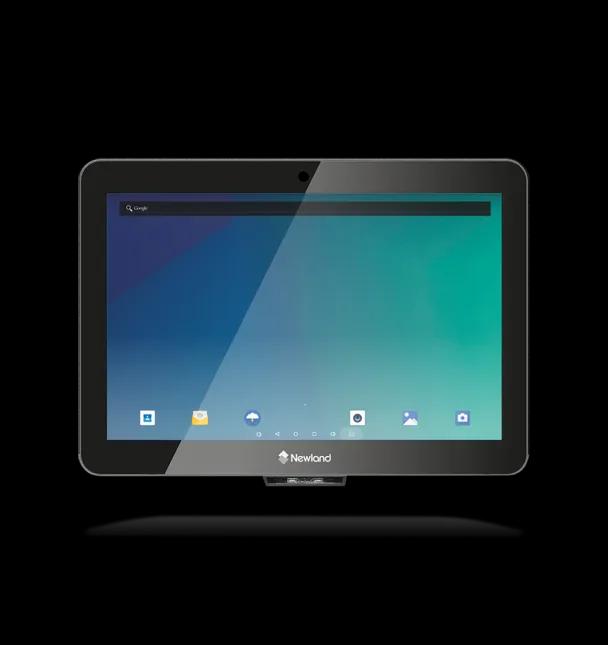
Micro Kiosk
Self-service has become an increasingly common part of everyday life. From checking in at a hotel to finding information in a shopping centre, people are becoming more comfortable using digital interfaces to complete simple tasks independently. Businesses and organizations are responding to this change by introducing technologies that make information and services easier to access.
One such technology is the touch-screen micro kiosk. Designed to provide interactive digital services in a compact footprint, micro kiosks can fit into spaces where larger self-service terminals may not be practical. They combine a touchscreen interface with computing capabilities to create a convenient point of interaction between people and digital services.
What Is a Touch-Screen Micro Kiosk?
A touch-screen micro kiosk is a compact digital kiosk that allows users to interact with information, applications, or services through a touchscreen. Unlike larger kiosk installations, micro kiosks are designed to occupy relatively little space.
Depending on their configuration, they can support functions such as information lookup, digital forms, registrations, wayfinding, ordering, appointment management, check-ins, feedback collection, and other self-service activities.
The exact capabilities depend on the hardware and software used. Some kiosks may include additional features such as printers, barcode or QR-code scanners, payment components, cameras, or other peripherals.
The main idea is simple: provide users with direct access to a digital service without requiring continuous assistance from an employee.
Why Compact Self-Service Matters
Space is an important consideration for many businesses. Retail stores, reception areas, transportation facilities, healthcare centres, educational institutions, and hospitality venues may have limited floor space.
A traditional self-service terminal may require a larger installation area. A micro kiosk can provide similar interactive functionality while taking up less room.
This makes compact kiosks useful for locations where every square metre matters. They can potentially be positioned near entrances, service counters, waiting areas, corridors, or other suitable locations depending on the environment.
The smaller footprint also provides organizations with greater flexibility when planning customer journeys and service points.
Making Self-Service Easier for Users
The effectiveness of a self-service system depends heavily on how easy it is to use. A complicated interface can create frustration and increase the need for staff assistance.
Touchscreens offer a familiar interaction method. Most people already use touchscreen smartphones and tablets, so tapping buttons, scrolling through menus, entering information, and selecting options can feel intuitive.
A well-designed micro kiosk interface should keep the process straightforward. Clear instructions, readable text, logical navigation, and visible confirmation messages can help users understand what they need to do at each stage.
The goal is not simply to add a touchscreen but to create an experience that allows users to complete a task with minimal confusion.
Applications Across Different Industries
Touch-screen micro kiosks can support a variety of use cases across different sectors.
Retail
Retailers can use compact kiosks to help customers find products, check availability, browse catalogues, access product information, or explore services.
For stores with limited space, a small interactive terminal can provide an additional digital touchpoint without requiring a large installation.
Hospitality
Hotels, resorts, restaurants, and other hospitality businesses can use kiosks for guest-facing services. Depending on the software, visitors may be able to check in, access information, request services, provide feedback, or explore local recommendations.
A kiosk positioned in a reception or waiting area can provide an additional channel for routine interactions.
Healthcare
Healthcare facilities often handle large numbers of visitors and administrative tasks. A micro kiosk can potentially support activities such as visitor registration, appointment check-in, information access, or form completion.
By digitizing straightforward processes, organizations can reduce dependence on paper-based workflows while giving visitors another way to interact with services.
Transportation
Airports, railway stations, bus terminals, and other transportation environments can benefit from digital self-service. Compact kiosks can be used for information, navigation, ticket-related services, or other applications depending on system integration.
Because transportation facilities can experience high foot traffic, clear and accessible digital interfaces can be particularly useful.
Corporate Offices
Businesses can also use micro kiosks for employee and visitor services. A kiosk near a reception area might support visitor registration, meeting information, wayfinding, or access to internal resources.
This can help organizations provide digital services without requiring a large reception setup.
Reducing Pressure on Staff
Self-service technology does not necessarily mean eliminating human interaction. Instead, it can help employees spend more time on tasks that require personal attention.
For example, if customers can independently access basic information through a kiosk, staff may have more time to handle complex questions or provide personalized assistance.
Similarly, in a reception environment, a kiosk can manage routine registrations while employees focus on visitors who require additional support.
This creates an opportunity to divide tasks between digital systems and human staff based on their strengths.
Improving Information Access
One of the useful features of digital kiosks is the ability to present information dynamically. Printed signs and brochures can become outdated, while digital content can be updated through the appropriate software or content management system.
A micro kiosk can therefore act as a digital information point. Organizations can display menus, directions, announcements, product details, service information, or other relevant content.
The value of this approach depends on proper content management. Information should remain accurate, concise, and easy to navigate.
What Makes a Micro Kiosk Effective?
The physical kiosk is only one part of the overall experience. Several factors should be considered when planning a touch-screen micro kiosk installation.
Screen quality: The display should be clear and easy to read under the lighting conditions of the installation area.
Touch responsiveness: Users should be able to interact with buttons and menus smoothly without unnecessary delays.
Software: The application should be designed around the specific task the kiosk is expected to perform.
Connectivity: Reliable network connectivity may be necessary when the kiosk needs to access cloud services, databases, or other systems.
Security: Devices handling personal or business information should be protected through appropriate security measures.
Accessibility: Interfaces should consider different users and provide readable content, intuitive navigation, and appropriate interaction options.
Maintenance: Organizations should have a plan for software updates, hardware maintenance, cleaning, and technical support.
Designing Around the User
A successful kiosk should be designed around the user's journey rather than simply the available technology.
Consider someone entering a building for the first time. They may not know where to go or what information they need. A kiosk with a clear welcome screen and a small number of obvious options can guide them toward the right service.
Similarly, a retail customer looking for a product should not have to navigate through multiple unnecessary screens.
Good kiosk design reduces the number of steps required to complete a task. It also provides clear feedback so users know whether an action has been completed successfully.
The Future of Compact Self-Service
As digital services become more common, organizations will continue looking for ways to make them accessible without requiring large infrastructure.
Touch-screen micro kiosks offer one possible approach. Their compact form factor makes them suitable for environments where space is limited, while their interactive capabilities can support a wide range of applications.
Future kiosk systems may also incorporate technologies such as artificial intelligence, advanced analytics, computer vision, voice interaction, and improved personalization. These technologies could create more responsive experiences while helping organizations understand how their digital service points are being used.
However, technology should always serve a clear purpose. Adding advanced features without considering usability can make a self-service system more complicated rather than simpler.
Final Thoughts
Touch-screen micro kiosks demonstrate how relatively compact technology can support meaningful digital interactions. By combining a small footprint with an intuitive touchscreen interface, they can provide users with convenient access to information and services in a variety of environments.
For businesses and organizations, the benefits can extend beyond convenience. Properly implemented self-service can help organize customer journeys, support staff, reduce reliance on paper-based processes, and provide another channel for delivering information.
The most effective approach is to start with the user's needs and then select the appropriate hardware, software, and features. When thoughtfully designed, a touch-screen micro kiosk can become a practical part of a modern digital environment—proving that self-service does not need to take up a lot of space to make a useful difference.